Contacts and CRM — Overview
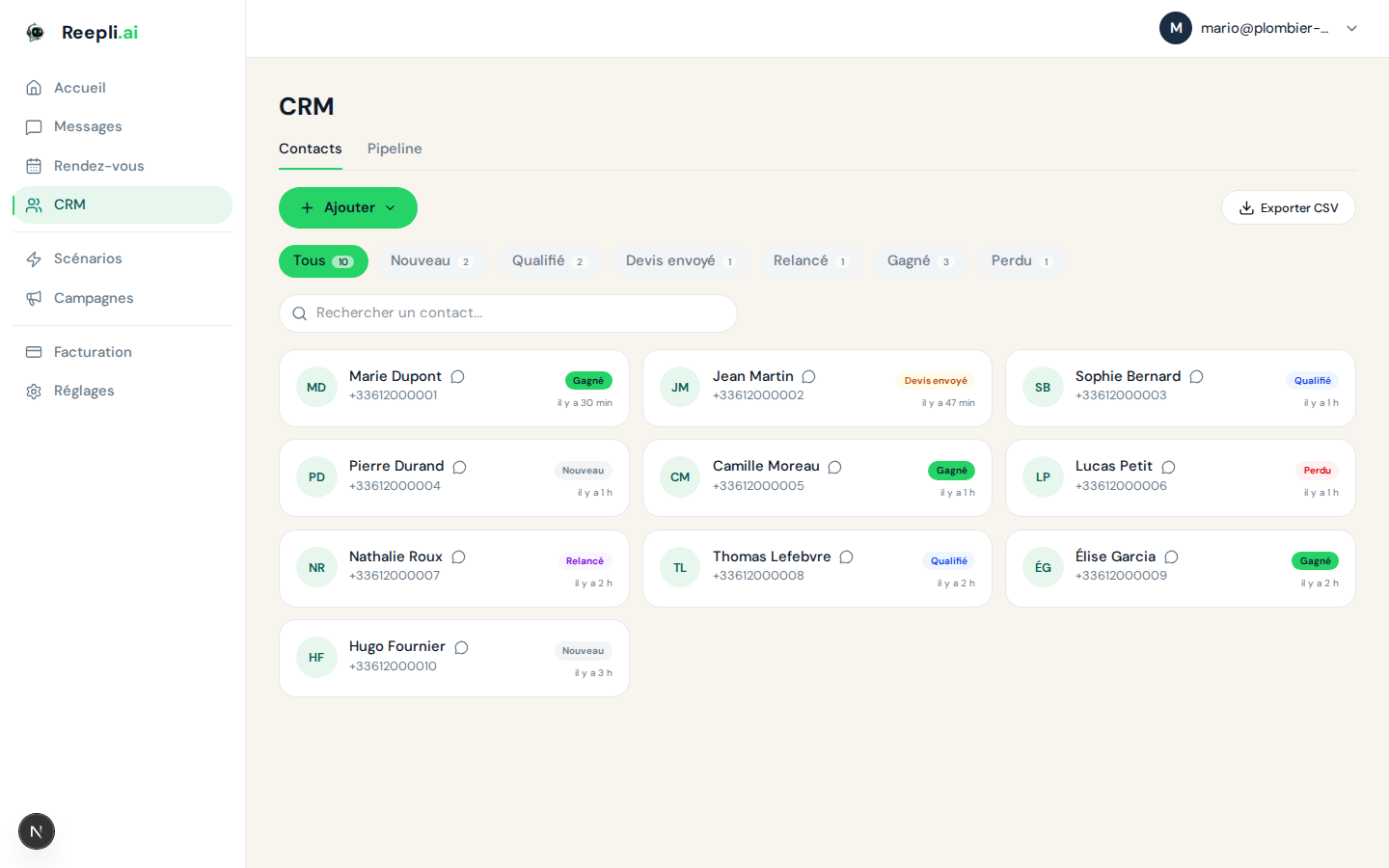
Reepli's Contacts module is a mini-CRM designed for the WhatsApp conversations of a solopreneur or a small team. Everyone who writes to you — and everyone you import — is gathered in one place, with a six-stage pipeline and an AI assistant that handles qualification on your behalf.
You access it from the Contacts section of the side menu.
What the Reepli CRM is (and what it isn't)
| Reepli is… | Reepli is not… |
|---|---|
| A conversational CRM, organized around the WhatsApp number | A general-purpose CRM with a thousand fields and workflows |
| A deliberate 6-stage pipeline | A pipeline editor you customize stage by stage |
| Self-driven by an AI assistant that reads conversations and qualifies | A passive CRM where you enter everything by hand |
| Lightweight: name, phone, email, status, score, labels, AI summary | A multi-channel repository with deals, invoices, and tasks |
This simplicity is intentional: you get started in 5 minutes without configuring 40 fields, and you keep your attention on what matters — the conversation, not the record.
The three objects to know
- Contact — a person, identified by their WhatsApp number.
- Conversation — all of the messages exchanged with that contact, grouped into a single thread in the Inbox.
- Label — a free-form tag to classify a contact outside the pipeline (
vip,salon-2026,partenaire, etc.).
The contact stage (New, Qualified, Quote sent, Followed up, Won, Lost) summarizes its position in the sales cycle. The lead score (from 0 to 100) summarizes its quality as the AI perceives it. The AI-generated customer summary condenses what you've exchanged into a single paragraph.
Main fields on a record
| Field | Source | Described in |
|---|---|---|
| Name, number, email | Manual input or import | Contact record fields |
| Contact stage | AI + manual adjustments | Lead CRM pipeline |
| Lead score | AI | Contact record fields |
| AI-generated customer summary | Updated automatically in the background | Contact record fields |
| Date of the last customer message | Updated with each message received | Contact record fields |
| Labels | Manual input | Contact record fields |
Automatic contact creation
A record is created on its own in two cases:
- First incoming WhatsApp message — as soon as an unknown number writes to you, Reepli creates the record and starts the conversation.
- CSV or vCard import — see Import and export.
In both cases, the phone number is the unique identifier. If a record already exists for that number, it is updated rather than duplicated.
Views and navigation
| Section | Use |
|---|---|
| Contact list | Search, sort, filter, export |
| Kanban view | Manage the pipeline across 6 columns |
| Contact record | The full detail of a single contact |
| Import | Import a CSV or vCard file from the Contacts page |
The conversation Inbox lives separately, but every message opens the corresponding record in one click.
The AI assistant and the contact record
The AI's main role is to keep the record up to date without you having to touch it. With each incoming or outgoing message, the AI:
- Updates the lead score based on the intent signals detected.
- Moves the contact stage as soon as a strong signal appears (quote sent, refusal, agreement, etc.).
- Regenerates the customer summary periodically.
- Automatically counts the follow-ups sent to a dormant customer to avoid pushing endlessly.
Everything remains editable by hand from the record, of course — you keep the final say.
Search and filters
The search bar at the top of the list searches across name, number, and email. For finer targeting (stage, score, labels, last activity), open the Filters panel — detailed in Filters and targeting.
Reepli does not have a library of named, reusable segments: filters are rebuilt on the fly each time you need them (list, campaign audience). This avoids the drift of forgotten segments.
Permissions
Reepli is designed for solopreneurs and small teams. For now, there is no fine-grained role system or partial visibility — anyone connected to a workspace sees all of that workspace's contacts.
If you run several separate activities, create multiple workspaces: each workspace has its own contact base, its own WhatsApp number, and its own subscription.
Articles to explore
- Manage contacts — add, edit, delete.
- Contact record fields — details of the available fields.
- Lead CRM pipeline — the 6 stages and their transitions.
- Filters and contact targeting — build an audience.
- Import and export — CSV and vCard.
A question about the Contacts module? Support is reachable via the chat at the bottom right of the app or by email at [email protected].