WhatsApp Cloud API — Overview
Reepli relies on Meta's WhatsApp Cloud API to let you send and receive WhatsApp messages at scale, from your own phone number and your own WhatsApp Business account (WABA). This page summarizes how it works and what you need to prepare to get started.
Reepli's "own-number" model
Unlike solutions where your number is rented through a reseller, Reepli uses the own-number model: you own the WhatsApp Business account, and Reepli connects to it via Meta's Embedded Signup — an official connection flow built directly into the dashboard.
In practice:
| Aspect | Reepli own-number mode |
|---|---|
| Owner of the WhatsApp Business account | You |
| Owner of the number | You |
| Meta-verified business name | Yours (existing or created via Meta) |
| Connection | Secure Facebook login → account selection → Reepli accesses it as an authorized application |
| Deactivation | You can revoke Reepli at any time from Meta Business Manager |
This model is more demanding at sign-up (it requires a Meta Business account and an available number), but much cleaner in the long run: you don't depend on an intermediary reseller.
How your messages flow
It's all invisible to you: the customer sends a message, Meta forwards it to Reepli, the message appears in your Inbox within a few seconds, and the assistant replies automatically if you have enabled it. You can step in at any time from the dashboard.
Coexistence with WhatsApp Business mobile
A particularity of the Cloud API in coexistence mode: you can keep using the WhatsApp Business app on your phone on the same number. When you type a message from the mobile app, it is automatically reflected in the conversation thread on the dashboard side, with a "sent from phone" indicator.
The result: whether you reply from the mobile app or from the web Inbox, the thread stays consistent and the full history is viewable from both sides.
Coexistence is handled on a best-effort basis by Meta. The sync delay can reach a few seconds, and some content (long voice notes, statuses) is not always reflected. For an optimal experience, we recommend routing everything through the dashboard.
What you can do with Reepli + WhatsApp Cloud API
| Capability | Description |
|---|---|
| Unified Inbox | All WhatsApp threads in Messages, with search, filters, and an automatic customer summary |
| AI assistant | Contextual automatic replies, lead qualification, appointment booking, human escalation |
| Meta templates | A catalog of pre-approved templates imported automatically on connection |
| Campaigns | Send templates to a filtered audience, with Stripe pre-authorization and live indicators |
| Built-in CRM | A 6-stage AI-driven pipeline, labels, notes |
| Quality monitoring | Tracking of your account quality (green/yellow/red), your daily messaging limit, and your business name status |
Prerequisites to connect your number
Before starting the connection, check that you have:
| Prerequisite | Detail |
|---|---|
| Active Reepli account | Registered on dashboard.reepli.ai, Trial / Starter / Pro / Business plan |
| Meta Business account | Existing on business.facebook.com (free, 5 minutes to create) |
| Available phone number | Not already used on the consumer WhatsApp app; not already attached to another WhatsApp Business account |
| Able to receive an SMS or a call | To confirm Meta's verification code |
The step-by-step details are in Connect a phone number.
WhatsApp Cloud API pricing
Meta bills per conversation (24-hour window), with four categories:
| Category | Initiated by | Relative cost |
|---|---|---|
| Service | The customer | The lowest (1,000/month free per account) |
| Utility | You (template) | Intermediate |
| Authentication | You (OTP template) | Low |
| Marketing | You (template) | The highest |
The details and strategy are in Messaging limits. On top of this, Reepli adds a platform cost (your subscription) and a transparent margin on paid campaigns — billed via Stripe.
Pre-approved templates
All messages you initiate outside the 24-hour window must go through a Meta-approved template. Reepli makes your life easier in several ways:
- Automatic import on connection: the moment your account is linked, Reepli imports all the already-approved templates as well as the official Meta library.
- A catalog of 147 templates: Meta makes available a library of 147 pre-approved templates (mostly utility and authentication), ready to use.
- Choice of languages: you choose which languages to import to reduce noise.
Details in Message templates.
Quality, daily limit, and name status
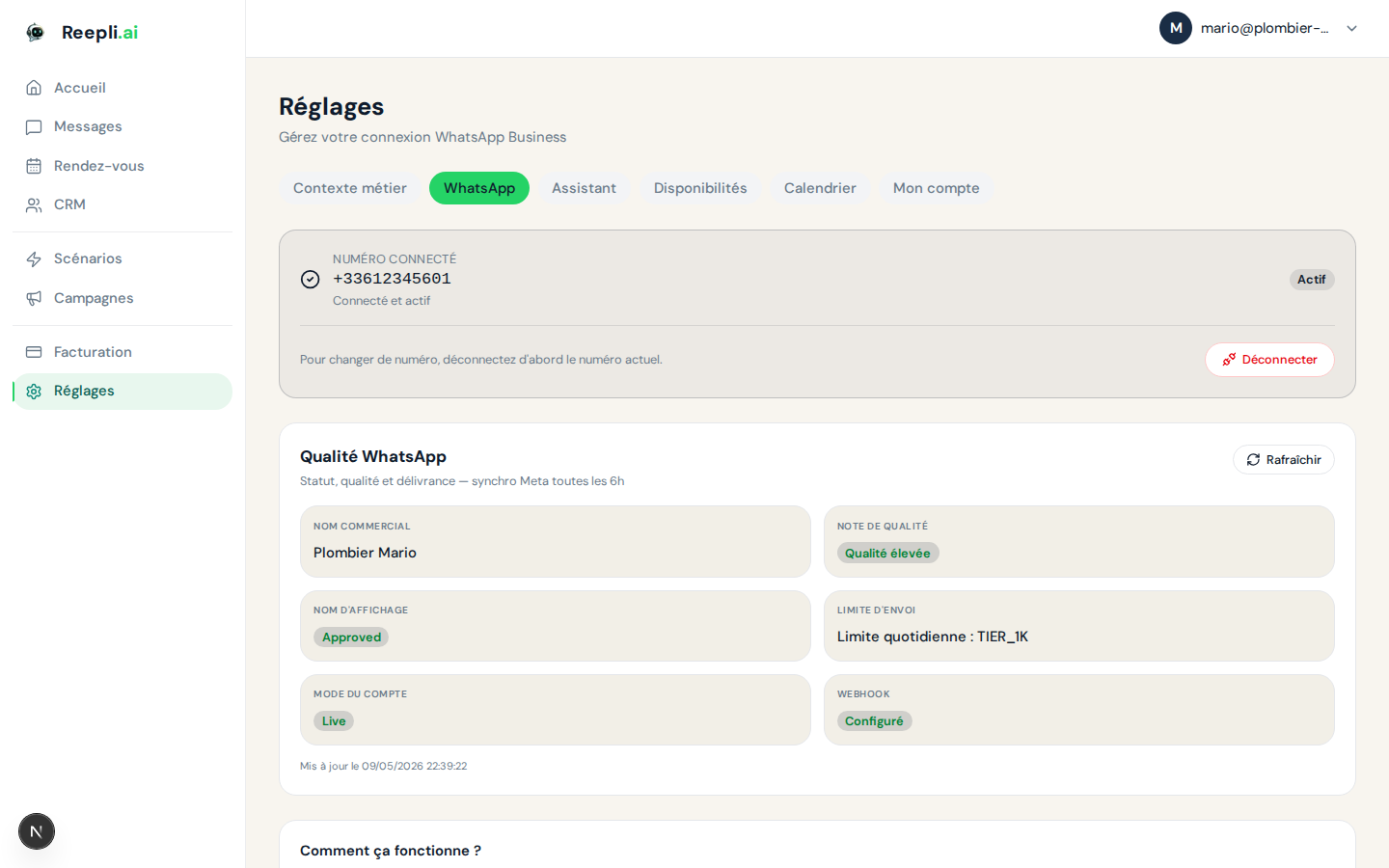
Reepli monitors three key Meta indicators for you, visible in Settings → WhatsApp:
| Indicator | Possible values | Meaning |
|---|---|---|
| Account quality | Green / Yellow / Red | Perceived quality of your sends (reports, blocks) |
| Daily messaging limit | 1,000 / 10,000 / 100,000 / Unlimited | Number of marketing conversations that can be initiated per 24 h |
| Business name status | Approved / Pending / Rejected | Status of the display name submitted to Meta |
The details and improvement levers are in Messaging limits.
The recommended steps
- Understand the WhatsApp Business API — differences from the mobile app.
- Connect your phone number — Embedded Signup step by step.
- Set up your business profile — display name, photo, description.
- Message templates — understand Meta templates.
- Approval process — submission, statuses, rejections.
- Messaging limits — 24-hour window, daily limit, quality.
- Green badge (official business account) — how to obtain it.
The support team is available to assist you with the WhatsApp connection and setup. Contact us via the chat in the bottom right of dashboard.reepli.ai or by email at [email protected].