Reepli Chatbot — Overview
The Reepli chatbot combines artificial intelligence and configurable behaviors to reply to your customers automatically on WhatsApp. There is no visual editor to draw: you activate the behaviors you need, you fill in your business context, and the assistant handles the rest.
Reepli deliberately chose not to offer a drag-and-drop visual builder. Rigid conversational flows break as soon as a customer phrases their request differently. A well-briefed AI adapts naturally to language variations, typos and a multilingual context, without you having to draw every branch.
The three pillars of the chatbot
How the chatbot works rests on three elements that you configure once:
- Your business context — services offered, FAQ, business rules, free-form instructions, default response language. This information is entered from the assistant settings.
- The activated behaviors — a list of situations the assistant must recognize (qualifying a lead, appointment booking, appointment reminder, etc.). You activate or deactivate them from the Scenarios page.
- The connected WhatsApp number — your own WhatsApp Business number connected to Reepli via the official Meta procedure.
Once these three pieces are in place, every customer message follows the same path: it arrives in your Reepli Inbox, the assistant reads the conversation context, chooses the most suitable behavior and sends the reply — all within a few seconds. Along the way, it can also trigger a useful action: create an appointment, record a quote, advance a lead in your sales pipeline.
How the assistant decides
On each message received, the assistant takes three things into account:
- The context of your business (services, FAQ, rules, free-form instructions) that you filled in.
- The recent history of the conversation with this contact.
- The list of behaviors that you have activated.
It then chooses the most suitable behavior, writes a personalized reply and sends it. Three scenarios arise:
- Free response — a tailored text, sent as-is to your customer. This is the most common case.
- Meta message template — a pre-approved template is sent when the 24-hour window is closed (appointment reminders, follow-ups).
- No response — the assistant decides that it is better to send nothing (off-topic message, human intervention in progress).
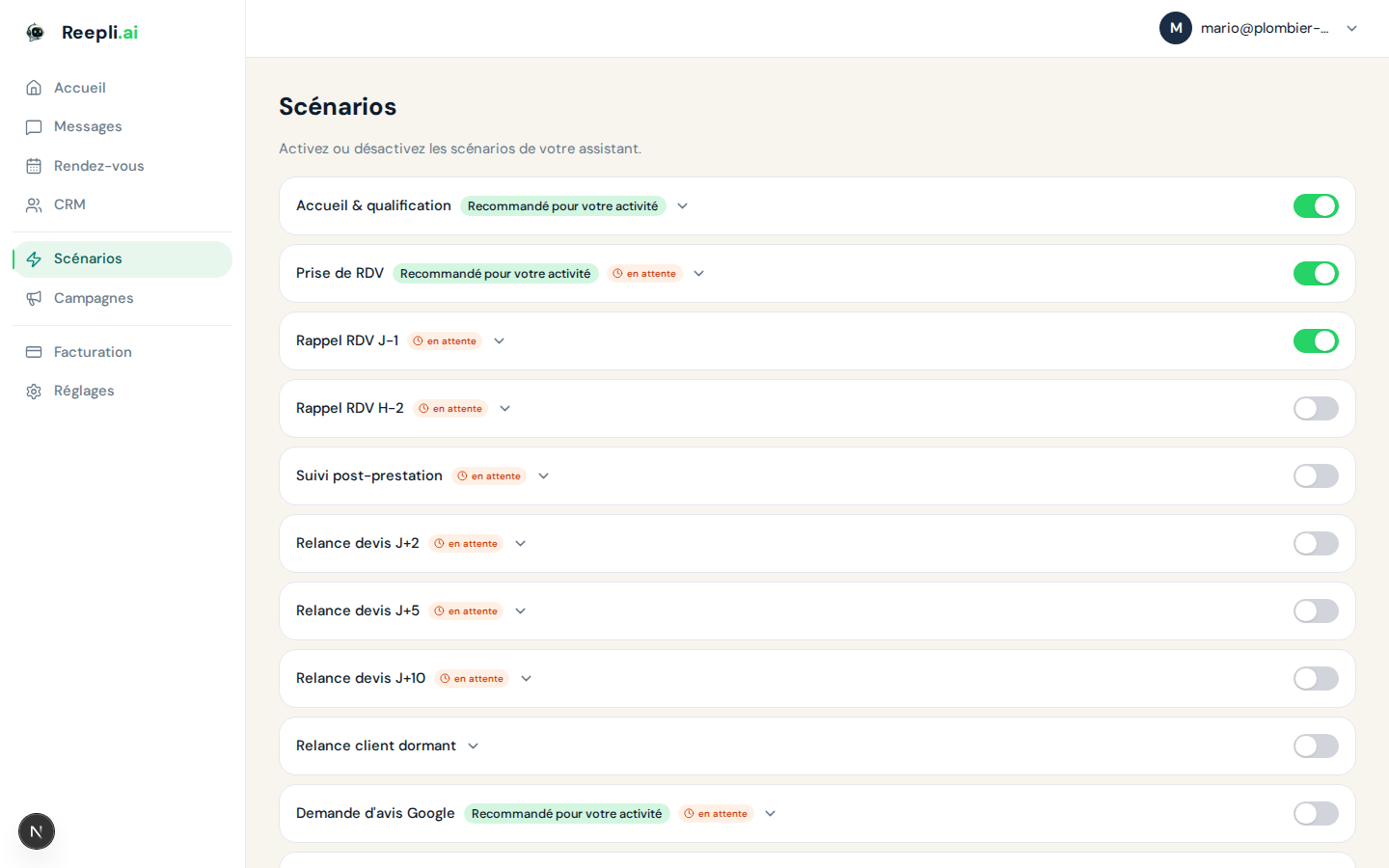
The available behaviors
You will find the full, activatable list from the Scenarios page. Each behavior corresponds to a situation the assistant must be able to recognize; there is no fixed script behind it.
| Behavior | Role | Trigger |
|---|---|---|
| Welcome & qualification | First contact, needs qualification | Incoming message |
| Appointment booking | Appointment booking | Incoming message |
| D-1 appointment reminder | Reminder the day before an appointment | Automatic |
| H-2 appointment reminder | Reminder 2 h before an appointment | Automatic |
| Post-service follow-up | Short message after a service | Automatic |
| Quote follow-ups (D+2 / D+5 / D+10) | Progressive follow-ups | Automatic |
| Dormant customer re-engagement | Reactivation of a dormant customer | Automatic (weekly) |
| Google review request | Soliciting a Google review | Automatic |
| 12-month loyalty | Anniversary message for the first visit | Automatic |
Behaviors marked "Automatic" are triggered by Reepli at the right time, without an incoming message being needed.
The concrete actions
When the assistant judges that a business action should accompany its reply, it triggers it in parallel with sending the message:
| Action | Effect |
|---|---|
| Create an appointment | Creates an appointment and the associated Google Calendar event |
| Record a quote | Records a quote and moves the lead to the Quote sent status |
| Mark a quote | Marks the quote as accepted or declined |
| Advance a lead | Moves the contact forward in your sales pipeline |
| Add a note | Adds a note to the lead's log |
| Hand off to a human | Switches the conversation to human mode; the assistant pauses |
Most WhatsApp chatbots just reply. Reepli goes further: the same assistant that writes the reply can record an appointment, create a quote or advance a lead in your sales pipeline. No need to reconnect your CRM by hand.
Plans and access
All plans include an unlimited WhatsApp chatbot. The difference comes down to the number of activatable behaviors and the message quota:
| Plan | Price | Message quota/month | Behaviors |
|---|---|---|---|
| Trial | free | 2,000 | 3 |
| Starter | €79/month | 1,000 | 3 |
| Pro | €149/month | 5,000 | all |
| Business | €299/month | 20,000 | all + custom |
Trial and Starter open the three essential behaviors: Welcome & qualification, Appointment booking, D-1 appointment reminder. The Pro and Business plans unlock the entire catalog (quote follow-ups, review requests, loyalty, etc.).
Once the monthly quota is reached, outbound messages are blocked until renewal. You can monitor your usage from the Billing page.
Multilingual
The assistant replies in the default language you set in the settings. If a customer writes in English while your default language is French, the assistant automatically adapts to the customer's language while respecting the rules you have set.
- Your dashboard language: the language in which the Reepli interface is presented to you.
- Default response language: the language in which your assistant replies to customers.
These are two distinct settings.
When the human takes over
At any time, you can pause the assistant on a conversation to reply yourself. Concretely, as soon as you type a message from the Messages page or from the WhatsApp Business app on your phone, the conversation switches to human mode: the assistant stops replying until you explicitly put the bot back in the loop.
The assistant can itself trigger this switch when it feels it can't respond properly (out-of-scope topic, aggressive tone, sensitive request).
Going further
- Configuring scenarios — how to activate and adapt each behavior.
- AI logic and rules — how to guide the assistant without coding.
- Message types — free text vs. approved Meta templates.
- Variables and substitution — how the assistant personalizes responses.
- Testing your chatbot — the recommended method before going live.
- AI responses in detail — how the assistant builds each response.
If you run into a blocker, contact the Reepli team from the chat at the bottom right of the dashboard or by email at [email protected].