WhatsApp green badge (Official business account)
The green badge is the green check that appears next to your company's name in WhatsApp. Officially called the Official Business Account (OBA), it signals to users that Meta has verified your brand's authenticity. This status is rare, demanding, and not available to everyone — here is how to assess your eligibility and submit the request via Reepli.
What the green badge actually changes
With or without the badge, your WhatsApp operation is the same. What changes is the presentation on the customer side:
| Element | Without badge | With green badge |
|---|---|---|
| Name shown in the conversation list | Your display name (or your number if not saved) | Your Meta-verified business name |
| Green check | — | Yes, next to the name |
| Name visibility even without being saved | Limited | Guaranteed |
| Perceived trust | Standard | High |
The main benefit: your messages are identified as coming from a verified business, without the customer needing to have you in their address book. This improves the read rate and reduces reflexive blocks.
Eligibility criteria
Technical conditions (required)
- Active Cloud API — you are already connected via Reepli.
- Business Verification approved on Meta Business Manager.
- Account quality at the Green level at the time of the request.
- Complete WhatsApp profile — photo, description, category, website.
- No active policy violations.
Brand notability criterion (the real filter)
Meta assesses brand notability — this is the criterion that eliminates 80% of applicants. In practice:
- Verifiable online presence: official website, active social profiles.
- Media coverage: press articles, mentions in legitimate media.
- Significant activity volume on WhatsApp (consistent, regular sends).
- Cross-channel consistency between your WhatsApp name, your website, and your social networks.
A small local business can be perfectly legitimate and not obtain the green badge, simply because the brand has not yet reached the notability threshold expected by Meta. This is not a judgment on the quality of your business — just a public visibility threshold.
The request process via Reepli
Step 1 — Check the prerequisites
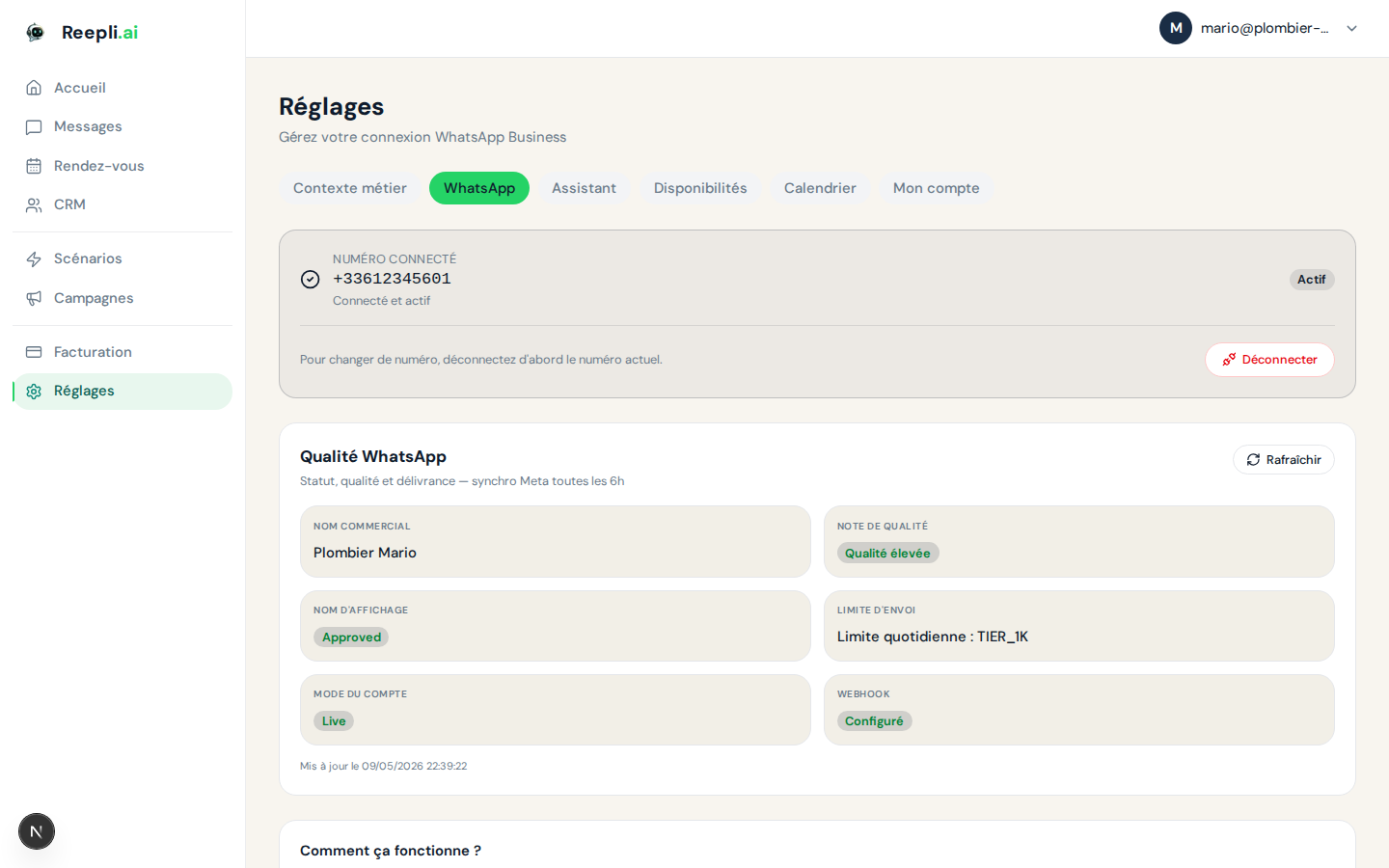
In Settings → WhatsApp, check that:
- Your account quality is Green.
- Your business name status is Approved.
- The WhatsApp profile is complete (photo, description, category, address, website).
- Meta Business Verification is approved.
- No policy violation notification.
Step 2 — Submit the request
- Go to Settings → WhatsApp.
- In the Green badge (Official business account) section, click Request verification.
- Reepli prepares the request with the information already known.
- Confirm the submission.
Step 3 — Provide proof of notability
Meta may ask for:
| Type of proof | Examples |
|---|---|
| Press articles | Links to third-party articles about your company |
| Social networks | Official profiles with a significant audience |
| Website | Official URL, company information visible |
| Official registrations | VAT number, license, certifications |
Be thorough: the more convincing proof you provide, the faster the decision.
Step 4 — Wait
| Phase | Typical duration |
|---|---|
| Initial review | 2 to 5 business days |
| Additional requests | Variable |
| Final decision | 1 to 4 weeks |
Step 5 — Result
- Approved: the badge appears immediately on your WhatsApp profile on the customer side.
- Rejected: reason returned, a 30-day wait before a new request.
Common reasons for rejection
| Reason | Detail | How to fix it |
|---|---|---|
| Insufficient notability | Brand not identifiable enough according to Meta | Work on SEO, press, social networks, wait |
| Inconsistent information | WhatsApp name ≠ legal entity or ≠ website | Align all your channels |
| Incomplete profile | Missing fields | Complete the photo, description, address, website |
| Insufficient quality | Yellow or red level at the time of the request | Improve the quality of your sends |
| Active violations | Policy breached | Resolve the violations |
| Account too new | Not enough usage history | Wait and build up legitimate activity |
If your request is rejected
A rejection is rarely final — it's more a "not yet" than a "never". Here is how to build toward the next request:
During the 30-day waiting period
- Read the Meta reason carefully to target your efforts.
- Strengthen your online presence: regular posting, guest articles, press mentions.
- Improve your account quality: targeted and relevant sends, reasonable frequency, opt-outs honored.
- Complete the profile to 100%.
Alternatives that work without the badge
The green badge is not essential for 99% of businesses. The following levers largely compensate:
- A professional profile photo + a clear description = a visually similar effect.
- WhatsApp buttons on your website (
wa.me/...) → the customer arrives with your number already known. - QR codes on physical media (storefront, business card).
- Inviting them to save the number in their contacts from the first message.
With these practices, the trust gap between a green badge and a well-maintained profile is minimal in the field.
Maintaining the badge once obtained
The badge is not permanent — it can be revoked. To keep it:
- Continued compliance with Meta policies.
- Account quality sustainably at the Green level.
- Regular activity on the account.
- Consistent information across your channels and WhatsApp.
- No abrupt name change (any change triggers a reassessment).
| Risk | Probability of losing the badge |
|---|---|
| Repeated policy violations | High |
| Persistently low quality | Medium |
| Prolonged inactivity | Low |
| Company name change | Systematic reassessment |
FAQ
Q: Is the badge paid? No, the request and obtaining are free.
Q: How many numbers can have the badge? Each number can apply separately, provided each meets the criteria.
Q: How long does it take to obtain the badge? Between 1 and 4 weeks on average, sometimes more depending on the complexity of the case.
Q: Is the badge available in all countries? Yes, worldwide.
Q: Is there a minimum volume of messages sent required? No official threshold, but regular, quality activity is expected.
Next steps
- Set up your business profile — an essential prerequisite.
- Messaging limits — maintain your account quality.
- Template approval process — avoid quality drops.
The Reepli team can assess the strength of your application before submission and suggest which elements to reinforce. Chat in the bottom right of dashboard.reepli.ai or email [email protected].