Profile settings
Your Reepli profile brings together your sign-in credentials and display preferences. Because Reepli is a single-operator service, this profile is also the one that runs your WhatsApp assistant and your Inbox: no one else logs in to your workspace.
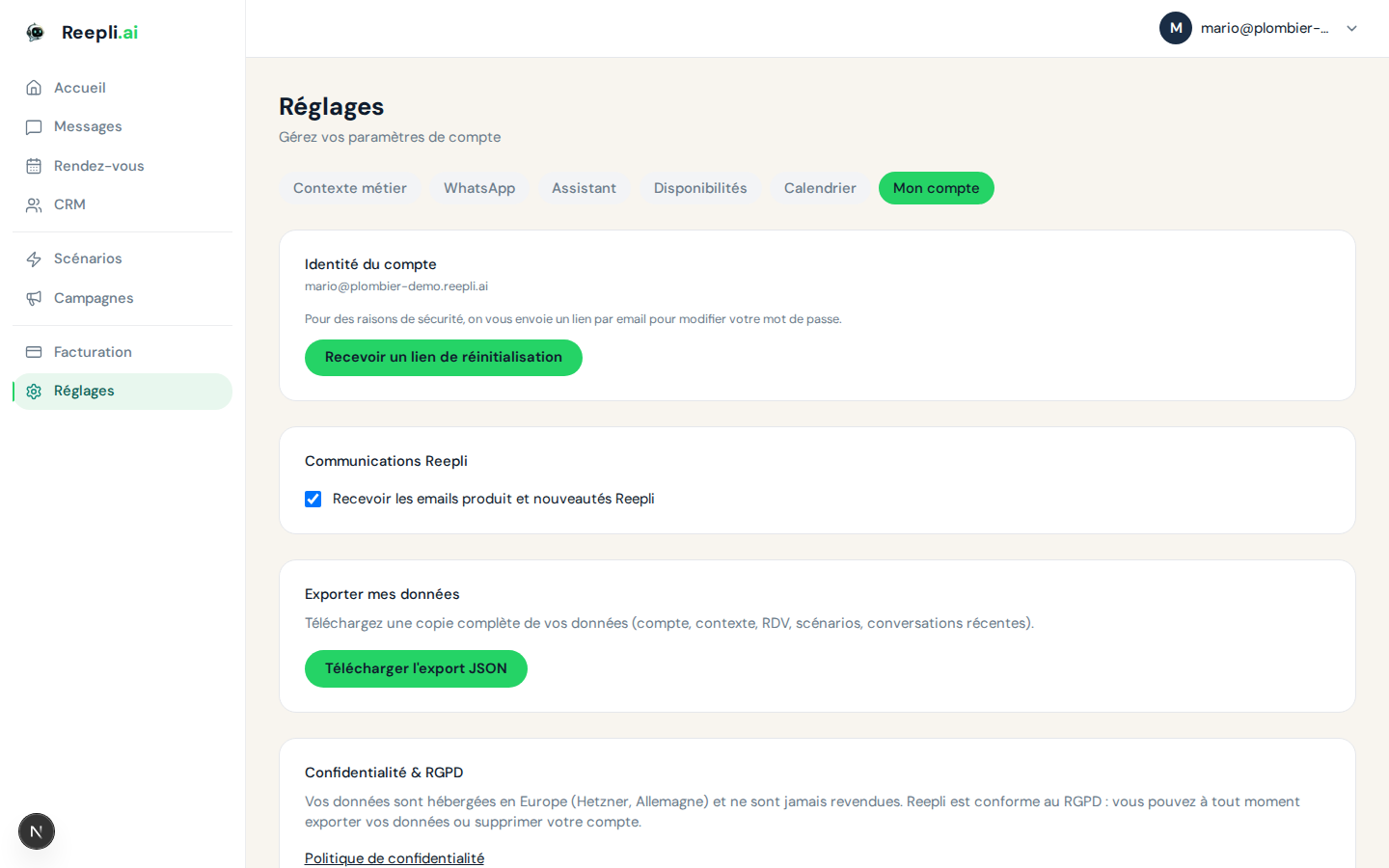
Accessing your profile
- Log in at dashboard.reepli.ai.
- Open the Settings menu in the sidebar.
- Click Account.
There you will find:
- The email address linked to your account.
- The password reset button.
- The interface language selector.
- The Reepli newsletter opt-in.
- The privacy controls (retention, legal retention, GDPR deletion).
Email address
The email address is used for signing in, password recovery, and transactional emails (end of trial, payment failure, appointment confirmation, etc.). It is set at sign-up.
To change it:
- Contact support from Contact support.
- Provide your current address and the new one.
- A confirmation link is sent to the new address.
- Click the link to validate the change.
Until you have confirmed the new address, the old one remains active. The verification link expires after 24 hours.
Password
Reset from the dashboard
- Go to Settings → Account.
- Click Reset my password.
- An email containing a secure link is sent to you.
- Follow the link and choose a new password.
Forgotten password
If you can no longer log in:
- On the sign-in page, click Forgot password?.
- Enter your account email address.
- You receive a reset link valid for 1 hour.
- Follow the link and set a new password.
Recommendations
| Criterion | Recommendation |
|---|---|
| Length | 12 characters minimum |
| Variety | A mix of uppercase, lowercase, digits, and special characters |
| Uniqueness | Different from your other passwords |
| Storage | A password manager (1Password, Bitwarden, Apple Keychain, etc.) |
Use a password manager to generate a long, random password. Avoid any password based on a date of birth, your company name, or a dictionary word.
Interface language
Reepli is available in eight languages. The dashboard, the menus, and the transactional emails follow this choice.
Available languages
| Language | Writing direction |
|---|---|
| French | Left → right |
| English | Left → right |
| Spanish | Left → right |
| Portuguese (Brazil) | Left → right |
| Italian | Left → right |
| German | Left → right |
| Hebrew | Right → left |
| Arabic | Right → left |
Change the language
- Open Settings → Account.
- Click the Interface language selector.
- Choose your language from the list.
- The interface updates immediately and the choice is remembered for all your future sessions.
The interface language does not change the language in which the assistant replies to your customers. That is set separately in Settings → AI assistant. You can run Reepli in French and have the assistant reply in Arabic, for example.
Reepli newsletter (marketing opt-in)
You can freely subscribe to or unsubscribe from the Reepli newsletter, which gathers product news, WhatsApp Business tips, and case studies.
- Go to Settings → Account.
- Turn the Receive the Reepli newsletter toggle on or off.
- The change is instant. No email confirmation is required.
This opt-in is strictly marketing. Transactional emails (reset, end of trial, payment) are still sent regardless of this choice: they are required for the service to work.
Each newsletter contains an unsubscribe link in the footer if you prefer to unsubscribe from your inbox.
Time zone and formats
The time zone affects how times are displayed in the Inbox, appointments, and reports. It is derived from the chosen language and your browser. For appointments and booking, the operator's time zone is set from Settings → Availability.
Privacy and data retention
Reepli applies a configurable retention policy. The main controls are in Settings → Privacy:
| Setting | Effect |
|---|---|
| Conversation retention period | The time after which conversations are automatically deleted |
| Legal retention | Suspends all automatic deletion while active (useful in case of a dispute) |
| GDPR export | Download all your personal data in JSON format |
| Account deletion | Erases your entire workspace and its associated data |
Deleting your account
Deleting your account is permanent. All your conversations, contacts, scenarios, and configurations are erased. Your Stripe subscriptions are canceled in the process.
- Go to Settings → Account.
- Scroll down to the Danger zone section.
- Click Delete my account.
- Enter your password to confirm.
- Type the confirmation phrase shown.
- Confirm with Delete permanently.
A confirmation email is sent. You have 14 days to cancel the deletion by clicking the link in the email. After that period, the erasure is carried out.
Some information (invoices, aggregated access logs) may be kept beyond account deletion, strictly to the extent required by accounting regulations and fraud protection.